✨ New Arrivals Just Dropped!Explore
InkJet Stencils
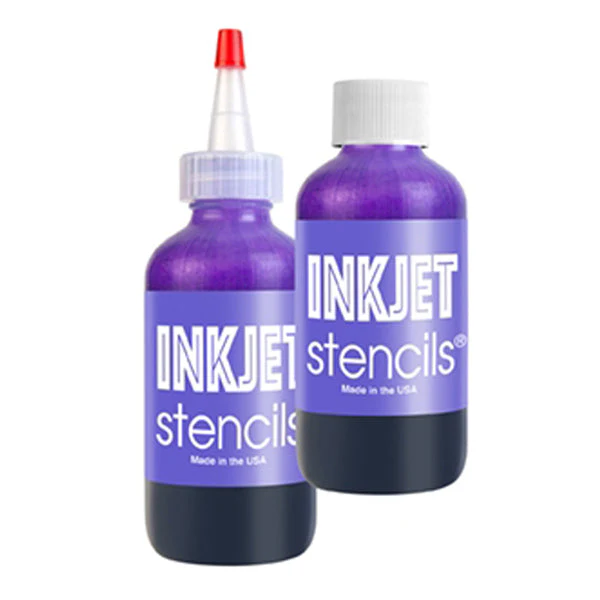
One 4 oz bottle of patented methyl violet formula for printing InkJet Stencils. Two bottles are needed to fill all four tanks on a new EcoTank printer. 4 ounces will print approximately 3,000 stencil.
- Any Epson EcoTank Printer: ET-2550, ET-2750 or any other. (PRINTER NOT INCLUDED)
- You must use a new printer. (CAN NOT USE AN EXISTING PRINTER)
Getting Started
- Take the printer out of the box and keep the instruction guide.
- DO NOT power up the printer until you have filled the ink tanks.
- Put gloves on to avoid staining your hands.
- Open the cover of the printer for all four ink tanks. Remove dispensing caps from all 4 colors Epson ink bottles.
- Open the InkJet Stencil Ink and pierce the foil seal with a pin or small pointed object. Place Epson dispensing cap on the InkJet Stencil bottle over the foil with black rubber washer in place.
- Dispense the ink in all four tanks with the intention of distributing it evenly, 1 oz in each tank. Each ink tanks have a mating dispensing cap that connects to the port to minimize spillage. Four ounces will not fill all tanks but will print about 3,000 stencils.
- Plug in the printer and turn it on and initiate the startup process
- Connect the printer to your internet network You can send files to the printer from your wireless device over the WIFI network. Connect the printer to your computer with a USB cable if your computer has a USB port. USB Cable is not supplied with the printer
- Start printing stencils.
One 4 oz bottle of patented methyl violet formula for printing InkJet Stencils. Two bottles are needed to fill all four tanks on a new EcoTank printer. 4 ounces will print approximately 3,000 stencil.
- Any Epson EcoTank Printer: ET-2550, ET-2750 or any other. (PRINTER NOT INCLUDED)
- You must use a new printer. (CAN NOT USE AN EXISTING PRINTER)
Getting Started
- Take the printer out of the box and keep the instruction guide.
- DO NOT power up the printer until you have filled the ink tanks.
- Put gloves on to avoid staining your hands.
- Open the cover of the printer for all four ink tanks. Remove dispensing caps from all 4 colors Epson ink bottles.
- Open the InkJet Stencil Ink and pierce the foil seal with a pin or small pointed object. Place Epson dispensing cap on the InkJet Stencil bottle over the foil with black rubber washer in place.
- Dispense the ink in all four tanks with the intention of distributing it evenly, 1 oz in each tank. Each ink tanks have a mating dispensing cap that connects to the port to minimize spillage. Four ounces will not fill all tanks but will print about 3,000 stencils.
- Plug in the printer and turn it on and initiate the startup process
- Connect the printer to your internet network You can send files to the printer from your wireless device over the WIFI network. Connect the printer to your computer with a USB cable if your computer has a USB port. USB Cable is not supplied with the printer
- Start printing stencils.
$52.50
Original: $150.00
-65%InkJet Stencils—
$150.00
$52.50Description
One 4 oz bottle of patented methyl violet formula for printing InkJet Stencils. Two bottles are needed to fill all four tanks on a new EcoTank printer. 4 ounces will print approximately 3,000 stencil.
- Any Epson EcoTank Printer: ET-2550, ET-2750 or any other. (PRINTER NOT INCLUDED)
- You must use a new printer. (CAN NOT USE AN EXISTING PRINTER)
Getting Started
- Take the printer out of the box and keep the instruction guide.
- DO NOT power up the printer until you have filled the ink tanks.
- Put gloves on to avoid staining your hands.
- Open the cover of the printer for all four ink tanks. Remove dispensing caps from all 4 colors Epson ink bottles.
- Open the InkJet Stencil Ink and pierce the foil seal with a pin or small pointed object. Place Epson dispensing cap on the InkJet Stencil bottle over the foil with black rubber washer in place.
- Dispense the ink in all four tanks with the intention of distributing it evenly, 1 oz in each tank. Each ink tanks have a mating dispensing cap that connects to the port to minimize spillage. Four ounces will not fill all tanks but will print about 3,000 stencils.
- Plug in the printer and turn it on and initiate the startup process
- Connect the printer to your internet network You can send files to the printer from your wireless device over the WIFI network. Connect the printer to your computer with a USB cable if your computer has a USB port. USB Cable is not supplied with the printer
- Start printing stencils.